 Nordcite
Search Console's generative AI report: what it shows, and what it can't
September 18, 2026NordciteLast reviewed September 18, 2026
Search Console now reports how often Google showed links to your site in AI Overviews and AI Mode. Here is what each number means, what the report leaves out, and what to pair it with.
Last reviewed September 18, 2026.
The short answer
The report counts one thing: impressions, "how many times links to your site were shown to a user in a generative AI feature on Google Search" (Google). AI Overviews and AI Mode are counted together.
You can group it by page, country, device and date. There are no queries, clicks or positions.
It counts links, not mentions. In 50 AI Overviews about Notion that we captured in the US on September 7, 2026, Notion was named in 42, but a Notion-owned page was cited in only 7. Only answers like those 7 can register.
Before reading a trend, check the Search generative AI control, the August 13–17, 2026 logging error (Google says the data has been restored) and the dotted line that marks preliminary data.
Pair it with a fixed set of queries per market and a dated record of each answer: what it said, who it named, which sources it cited.
What is the generative AI performance report?
It is a Search Console report that counts how often Google showed links to your site in its generative AI features on Search. Google's help page says: "The generative AI performance report shows data about how your site performs in generative AI features on Google Search."
It covers AI Overviews and AI Mode, and Google adds: "We expect to update this list over time as we develop Google Search." Discover has a separate report, and Search Labs experiments are excluded.
Google announced the report on June 3, 2026, and Search Engine Land reported the same day that it went first to a subset of UK site owners. The help page now says: "As of August 31, 2026, we've rolled out these insights to all websites worldwide."
Google's guide to generative AI features in Search (last updated July 10, 2026) sends site owners to this report for measurement. The same guide says optimizing for generative AI search "is optimizing for the search experience, and thus still SEO." Some call this work GEO or AEO; Google calls it SEO.
What does an impression mean in this report?
An impression is one showing of a link to your site in AI Overviews or AI Mode. It is not a count of answers that mention your brand, of people, or of clicks.
For both features, Google's Performance report help says "Standard impression rules apply." Under those rules, a link usually counts when it appears on the current page of results, "whether or not the item is scrolled into view." Inside carousels and expanding sections, it typically has to be scrolled into view or expanded.
The report counts in two ways: "Data grouped by country, device, or date is aggregated by property. Data grouped by page is aggregated by page." Google's general help explains the difference: grouped by property, one result with several links to your site counts once; grouped by page, each linked page counts. That is why "The chart totals can sometimes differ from the table totals."
| Tab | What Google says it groups by | Use it to see |
|---|---|---|
| Pages | "the final URL linked by a generative AI feature after any redirects" | Which of your pages AI answers link to |
| Countries | "the country where the search originated" | Which markets see your links |
| Devices | "the type of device on which the user is searching" | Mobile versus desktop |
| Dates | "days, weeks, or months" | Direction over time |
The usual Performance report limits apply, including the "1,000 row limitation." Preliminary data "is indicated by a dotted line on the graph." Values shown as "~" or "-" become zeros when you export, so a zero in your spreadsheet is not always a zero.
What can't the report tell you?
It can't tell you which searches produced the impressions, what the answer said, whether you were named without a link, who else appeared, or whether anyone clicked.
| You want to know | In this report? | Where else to look |
|---|---|---|
| Which queries showed your link | No | Regular Performance report, mixed with classic results |
| Clicks and click-through rate | No | Regular Performance report, mixed with classic results |
| Your position | No | Regular Performance report, where an AI Overview is one position |
| AI Overviews versus AI Mode | No, one combined count | Not available |
| What the answer said, and whether it was right | No | A dated record of the answer |
| Brands named without a link, competitors, other sources | No | A dated record of the answer |
The biggest gap is mentions. Being named means your brand appears in the answer text. Being cited means a page from your site is one of the linked sources. The report sees only citations, and only as a count.
On September 7, 2026, we recorded the Google AI Overviews for 50 searches about Notion, from the United States, signed out, one capture per query between 09:47 and 10:07 UTC. (Notion did not commission this and has no relationship with Nordcite.) Notion was named in 42 answers; a Notion-owned page was cited in 7. The other 35 discussed Notion without linking to it, so none of them could add an impression to Notion's report. It is one brand on one morning; the Notion study has every exhibit.
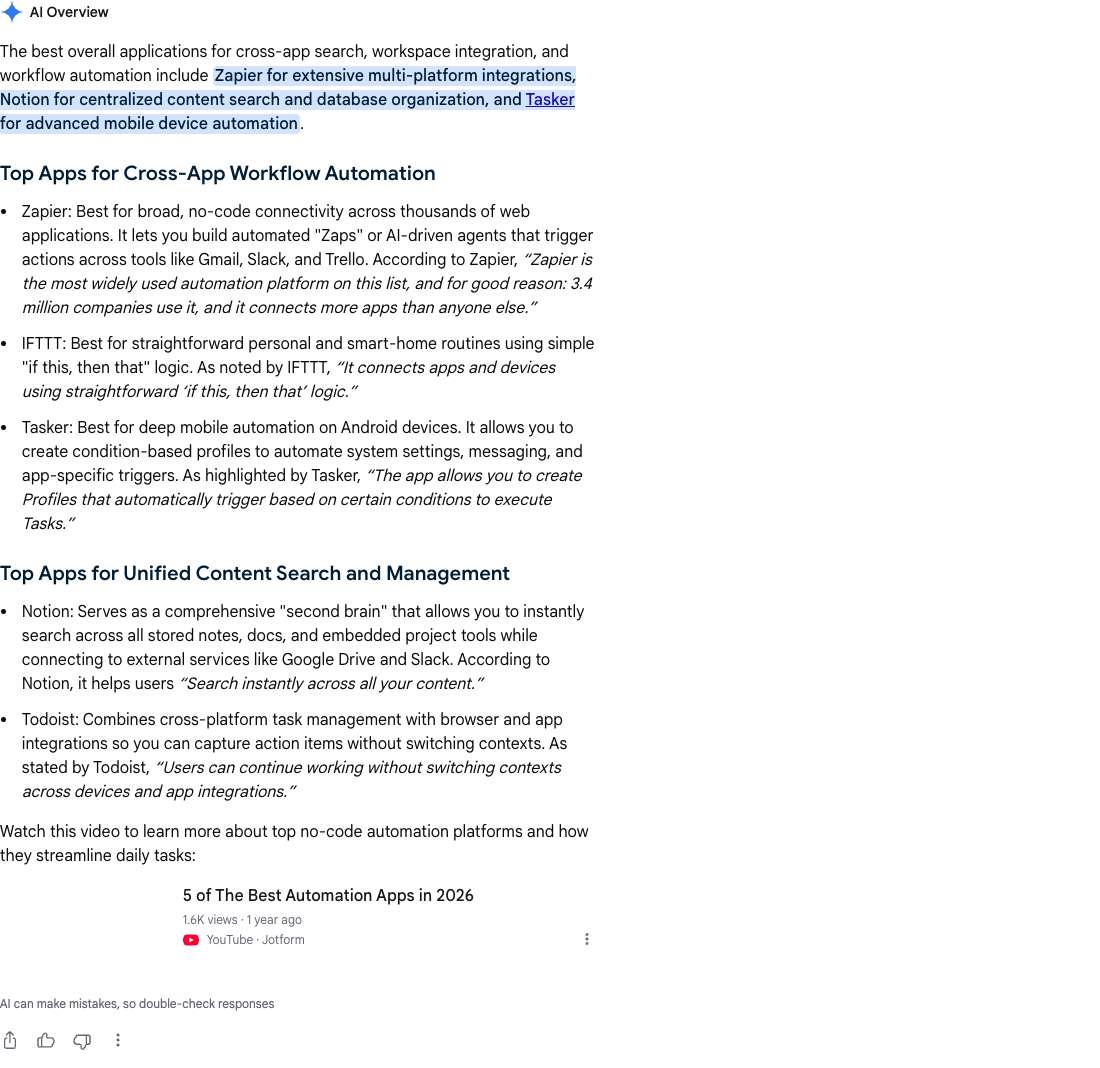
Exhibit 03. Google AI Overview for "best apps for cross app search and automation", United States, signed out, captured September 7, 2026, 09:53 UTC. It names Notion and attributes a quote to it; the linked sources are makeuseof.com and a YouTube video.
How do AI Overviews and AI Mode show up in the regular Performance report?
They are already there, inside the Web search type, mixed with classic results. The generative AI report "includes data from the Web search type in the Performance report (Search results)," per Google's help page, and Google's AI features documentation says the same.
The counting rules, from the Performance report help:
- AI Overviews: "An AI Overview occupies a single position in search results, and all links in the AI Overview are assigned that same position." A click on a link to an external page counts as a click.
- AI Mode: "Position in AI Mode follows the same methodology as a Google Search results page." Clicks count the same way.
- Follow-ups: "If a user asks a follow-up question within AI Mode, they are essentially performing a new query." Its impressions, positions and clicks count toward that new query.
- Search Labs: experiments are excluded.
So a page linked from an AI Overview takes the AI Overview's position, whatever it ranks in the classic results, and average position blends the two. Google's help pages describe no filter that separates AI features from classic results in this report.
Is your site excluded? Check the Search generative AI control
Check this before you read any trend. The control decides whether your site's links and content can appear in AI Overviews, AI Mode and generative AI features in Google Discover. Set a property to exclude, and its numbers in this report will fall toward zero within days.
It sits under Settings > Search generative AI, with three choices: include (Google: "This is the default control for all properties"), exclude, or inherit from a parent property. On excluding, Google says:
- "You won't receive any traffic or impressions from these features."
- "Content crawled from your site won't be eligible to be used as an input to generate an AI response or preview in Search generative AI features."
- The control "isn't used as a ranking or inclusion signal affecting other parts of Search."
- "This control doesn't affect AI training." For training, Google points to Google-Extended (what that token does and doesn't do).
Content "will be excluded within 1-2 days after the control goes live," Google says, though some may take longer because of caching and propagation.
Inheritance is where accidents happen: "By default, a property inherits its Search generative AI control from its closest parent that has changed its control to stop inheriting." One change on a domain property can flow down to every child property that still inherits. Check the top-level property first, then any child with its own setting, and note the date of any change on your trend.
The control covers your own site's links and content, not what other sites say about you. Google's help page is explicit: "Content from other sites will still be available in those features, and it may appear similar to yours."
Five good uses of the report
- See which pages AI answers link to. Sort the Pages tab by impressions and compare the list with what you expected. In our Notion captures, Notion's own pages were cited mostly for questions about its refunds, pricing, support and uptime (exhibits 41 and 44–47), and in none of the 25 best-of and alternatives answers, though Notion was named in 21 of them. A list of help-center pages tells you where your site is a source, and where it isn't.
- Compare countries. The Countries tab groups by where the search originated, so you can set each market against where you sell. Launch dates differ: Google launched AI Overviews and AI Mode in France on July 22, 2026, so French data starts there.
- Read the trend, with notes. Google's data anomalies page records that "A logging error caused a decrease in impressions on the Generative AI performance report in Search for data from August 13 - August 17, 2026," and later adds: "Missing data for this period has been restored." Re-export any August data you saved before the fix. Treat the dotted line as provisional, and remember that Google expects to change which features the report covers, which could move the line with no change on your site.
- Group pages by type. Export the Pages table and tag each URL (pricing, docs, blog, product, comparison) to see which kinds of pages AI answers link to. For a rough sense of dependence, set each page's AI impressions beside its Web impressions in the regular Performance report. On large sites, the 1,000-row limit means the export may not list every URL.
- Spot pages that never appear. List the pages that should answer questions about you, such as pricing, security, refunds and comparisons, and find the ones missing. Check eligibility first: Google says a page "must be indexed and eligible to be shown in Google Search with a snippet" to be a supporting link in AI Overviews or AI Mode, and lists nosnippet, data-nosnippet, max-snippet and noindex as ways to limit what is shown (Google). If an eligible page is still absent, look at what the answers cite instead; our guide to getting cited covers what to do next.
What should you pair the report with?
A fixed set of queries for each market, with a dated record of every answer. Search Console tells you how often your links were shown; the record tells you what was shown.
For each query, keep whether an AI Overview appeared, whether your brand was named, whether your site was cited, which competitors were named, and the sources in order, with the date and the country. Re-check the same queries on a schedule and compare like with like. How to report AI visibility to clients sets out the method and a one-page template. This is also what our report records per query, with a dated screenshot of each answer.
Two other reports are worth knowing:
- Bing Webmaster Tools' AI Performance, in public preview since February 10, 2026, covers different surfaces: Microsoft Copilot, AI-generated summaries in Bing and select partner integrations. Unlike Google's report, it shows grounding queries, "the key phrases the AI used when retrieving content that was referenced in AI-generated answers," and citation counts by page. Bing says "The data shown represents a sample of overall citation activity." Keep its numbers separate from Google's.
- Merchant Center's AI performance insights, which Google said on September 16, 2026 are now available to businesses in Australia, Canada, India, New Zealand and the US, after a US pilot. Google says they compare a brand's share of voice with other brands "across surfaces like AI Mode and AI Overviews". The UK and the EU are not on the list.
Whatever you add, Google's guide offers a test for any tool: "Be wary of third-party tools that promise ranking success or claim to use 'internal' Google metrics."
What we don't know yet
- What Google adds next. Google, as quoted by Search Engine Land on June 3, 2026: "we'll introduce additional metrics over time." John Mueller has written that classic position counting is "hard to map" onto today's results (Search Engine Roundtable, September 10, 2026) and that tracking for AI Mode and AI Overviews will "evolve over time" (Search Engine Roundtable, September 16, 2026).
- How collapsed answers count. Standard impression rules apply to AI Overviews, but Google doesn't say how they apply when an AI Overview loads collapsed behind "Show more".
- The split between AI Overviews and AI Mode. One number covers both.
- How impressions relate to mentions. No public data connects them. In our Notion captures, naming and linking diverged sharply, but that is one brand on one morning.
FAQ
Is an AI Overview counted as an impression in Search Console? Yes, when it shows a link to your site. It counts in the regular Performance report under the Web search type, where the whole AI Overview takes one position, and in the generative AI performance report. An answer that names you without linking to you doesn't count.
Can I see AI Mode separately in Search Console? No. The generative AI report puts AI Overviews and AI Mode into one impressions count, and Google's help page describes no way to split them. In the regular Performance report, each AI Mode follow-up counts as a new query.
How do I track AI Overviews in Search Console? Use the generative AI performance report for link impressions by page, country, device and date, and the regular Performance report for queries and clicks, with AI features mixed in. Neither shows the answer itself, so pair them with a dated record of the answers for a fixed set of queries.
Will opting out of AI Overviews hurt my rankings? Google says the control "isn't used as a ranking or inclusion signal affecting other parts of Search." The cost is in the AI features themselves: no traffic or impressions from them. It covers your own site, so it can't change what other sites say about you.
Why can't I see the generative AI report? Google's help page says access is still reaching some properties, and that a site may not have had enough impressions in these features, possibly because it has been excluded. Check Settings > Search generative AI, including on any parent property.
Sources
- Google, Search Console Help, "Generative AI performance report (Search)", accessed September 18, 2026. https://support.google.com/webmasters/answer/16984139
- Google, Search Console Help, "Search generative AI control", accessed September 18, 2026. https://support.google.com/webmasters/answer/16908024
- Google, Search Console Help, "What are impressions, position, and clicks?", accessed September 18, 2026. https://support.google.com/webmasters/answer/7042828
- Google, Search Console Help, "Data anomalies in Search Console", accessed September 18, 2026. https://support.google.com/webmasters/answer/6211453
- Google Search Central Blog, "Introducing Search Generative AI performance reports in Search Console", June 3, 2026. https://developers.google.com/search/blog/2026/06/gen-ai-performance-reports
- Search Engine Land (Barry Schwartz), "Google Search Console AI performance reports and controls to block your content in AI responses", June 3, 2026. https://searchengineland.com/google-search-console-ai-performance-reports-and-controls-to-block-your-content-in-ai-responses-479298
- Google Search Central, "Optimizing your website for generative AI features on Google Search", last updated July 10, 2026. https://developers.google.com/search/docs/fundamentals/ai-optimization-guide
- Google Search Central, "AI features and your website", last updated December 10, 2025. https://developers.google.com/search/docs/appearance/ai-features
- Search Engine Roundtable (Barry Schwartz), "Google: The Old Position 1-10 Is Hard To Map For Site Owners", September 10, 2026. https://www.seroundtable.com/google-position-1-10-hard-map-42053.html
- Search Engine Roundtable (Barry Schwartz), "Google: Google Search Console AI Position Reporting Will Evolve Over Time", September 16, 2026. https://www.seroundtable.com/google-search-console-ai-reporting-change-42099.html
- Google France (Sébastien Missoffe), "Lancement des Aperçus IA et du Mode IA dans la Recherche Google en France", July 22, 2026. https://blog.google/intl/fr-fr/nouveautes-produits/explorez-obtenez-des-reponses/recherche-ia-apercus-mode/
- Microsoft Bing Webmaster Blog (Krishna Madhavan, Meenaz Merchant, Fabrice Canel, Saral Nigam), "Introducing AI Performance in Bing Webmaster Tools Public Preview", February 10, 2026. https://blogs.bing.com/webmaster/February-2026/Introducing-AI-Performance-in-Bing-Webmaster-Tools-Public-Preview
- Google (Ashish Gupta), "Boost your holiday sales with these agentic commerce updates", September 16, 2026. https://blog.google/products-and-platforms/products/shopping/google-shopping-updates-holiday-shopping/
- Nordcite, Notion sample: 50 Google AI Overviews, United States, signed out, captured September 7, 2026. /blog/notion-ai-overviews-citations
See what Google's AI Overview says about your brand, in the country you sell in. Nordcite's AI Visibility Report runs a query set written for your brand in the markets you choose and photographs every AI Overview: who is named, which sources are cited, dated. A person approves your queries before anything runs and reads the report before it ships. Each report is scoped and quoted for the brand it describes. See a sample report · Ask for a quote
Read next
- How to report AI visibility to clients when the answers keep changing
In Ahrefs' data, AI Overviews changed about every 2 days. A client-ready way to report AI visibility: fixed queries, dated screenshots, real denominators.
- How to get cited in Google's AI Overviews: what the evidence says in 2026
What gets a brand named and cited in Google's AI Overviews and AI Mode: Google's own guidance, the studies worth trusting, and 50 dated screenshots.
- We photographed 50 Google AI Overviews about Notion. Here's who got cited.
50 Google AI Overviews about Notion, captured in the US on Sep 7, 2026: YouTube cited in 36, Reddit in 17, notion.com in 6. 110 domains, 83 cited once.